
If you’re creating AI content with RunwayML, you know the drill: paste a prompt, click generate, wait, download, and repeat. Now imagine doing that 50, 100, or even 500 times for a single project. The manual repetition isn’t just tedious—it’s a massive drain on your creative time and productivity.
Automator for RunwayML changes everything. This Chrome extension transforms RunwayML into a bulk generation powerhouse, letting you queue up hundreds of prompts and run them automatically while you focus on the creative work that actually matters.
The Problem Every RunwayML Creator Faces
Whether you’re a content creator, digital artist, marketing professional, or AI enthusiast, working with RunwayML at scale means facing the same frustrations:
- Endless repetition: Copying and pasting prompts one by one, clicking the same buttons hundreds of times
- Lost productivity: Spending hours babysitting the generation process instead of doing creative work
- Missed opportunities: Limiting your output because batch generation is too time-consuming
- Organizational chaos: Losing track of which prompts worked, which failed, and what still needs to be generated
- Error recovery nightmares: One failed prompt can derail your entire workflow
If you’ve ever found yourself wishing there was a “run all” button for your RunwayML prompts, you’re not alone.
Meet Automator for RunwayML: Your AI Generation Assistant
Automator for RunwayML is an unofficial automation suite designed specifically for creators who work with high volumes of AI-generated content. Instead of clicking through each prompt manually, you build a queue, hit run, and let the extension handle the rest.
Think of it as having a tireless assistant who can submit prompts, wait for results, handle errors, retry failed attempts, and keep everything organized—all while you’re working on other tasks or even sleeping.
What Makes This Extension Different?
Complete Workflow Automation
Automator supports all major RunwayML generation workflows: Text-to-Image, Text-to-Video, and Image-to-Video. Whether you’re generating product shots, creating video clips for social media, or experimenting with different style variations, the same queue-based approach works across all modes.
Intelligent Task Management
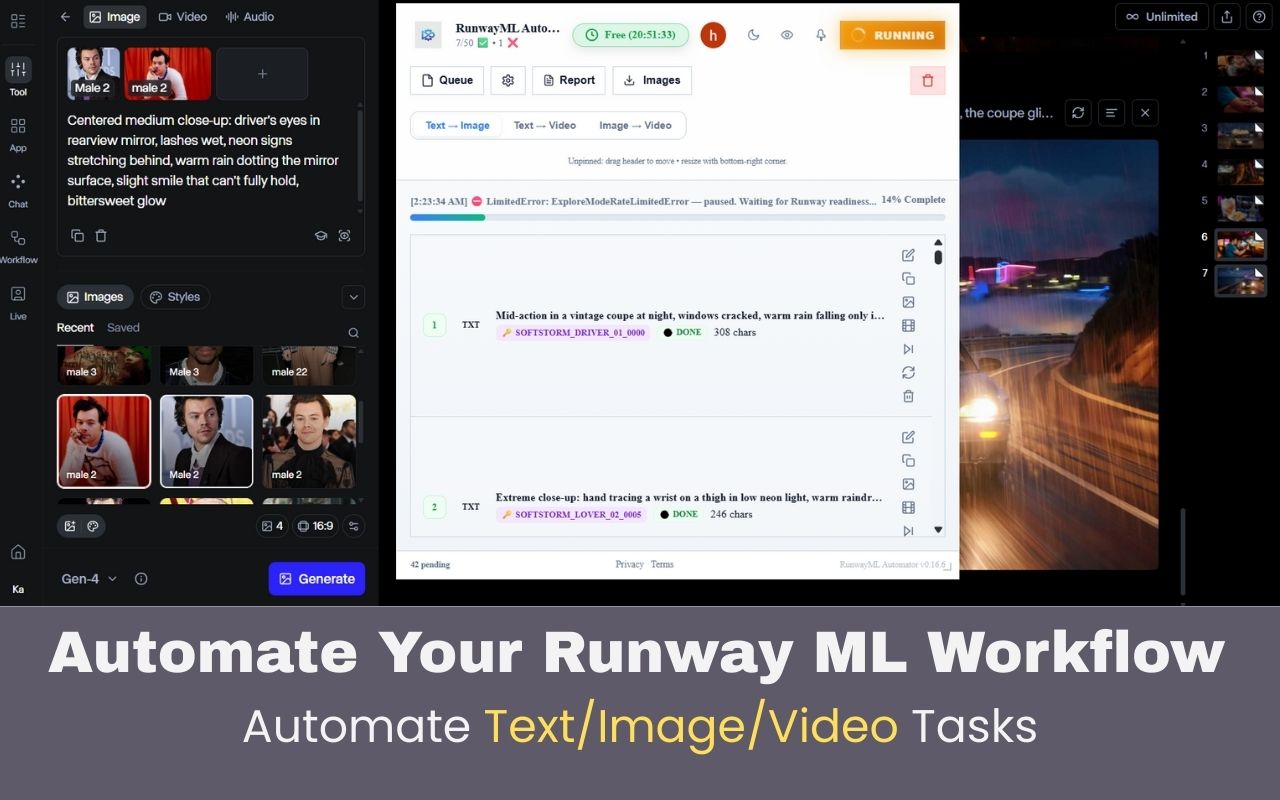
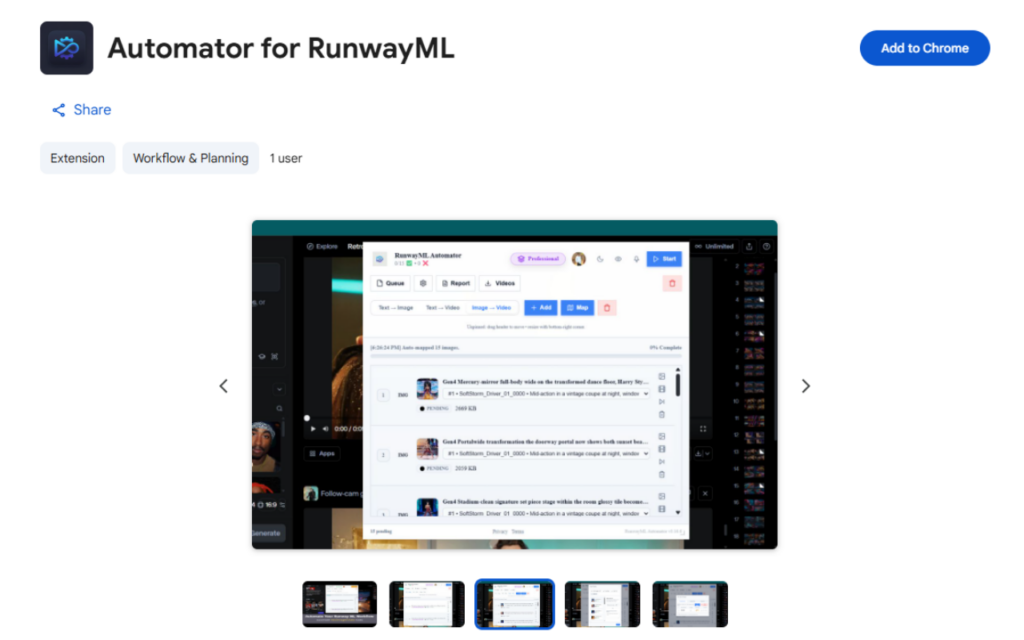
The extension adds a floating control panel to your RunwayML workspace where you can see your entire queue at a glance. Every prompt is tracked with its status (Pending, Running, Done, or Error), attempt count, timestamp, and error details if something goes wrong.
Flexible Prompt Input
Build your queue however works best for you: paste a list of prompts directly, import TXT files, or upload CSV files. The extension even supports advanced formatting for complex workflows with multiple prompt sections and clip-based structures.
Smart Retry Logic
Network hiccup? API timeout? No problem. Automator automatically retries failed prompts and continues to the next item, so your batch doesn’t grind to a halt over temporary issues.
Bulk Download Helpers
Generate hundreds of images or videos, then download them all at once into organized subfolders. No more right-clicking and saving each file individually.
Core Features That Save You Hours
1. Queue-Based Generation System
The heart of Automator is its queue system. Instead of running one prompt at a time manually, you:
- Add all your prompts to the queue (paste them, import a file, or type them in)
- Click “Run” once
- Watch as the extension automatically submits each prompt, waits for completion, and moves to the next one
Your queue stays visible even after completion, giving you a complete record of what was generated, when, and any issues that occurred.
2. Multiple Generation Modes
Text → Image
Perfect for generating variations of concept art, product images, or style explorations. The extension clears the previous prompt, pastes the next one, clicks Generate, and waits for the result before moving forward.
Text → Video
Queue up your video prompts and let Automator handle the sequential submission. Each prompt is tracked with status updates, and failed items can be retried automatically.
Image → Video Batch Processing
This is where Automator really shines. Upload multiple images, map prompts to each image (or use one prompt for all), and the extension will automatically cycle through your images, submitting each one for video generation. You can use:
- Sequential mapping (prompt 1 → image 1, prompt 2 → image 2)
- Manual mapping (choose specific prompt-image pairs)
- CSV-based mapping for large batches
3. Advanced Prompt Management
Import prompts from various sources:
- Paste: One prompt per line, instant queue creation
- TXT files: Import prompt libraries you’ve built over time
- CSV files: The extension reads the first column as prompts
- Advanced TXT format: Structure your prompts with markers like “Image Prompt” sections, “Clip 1/Clip 2” blocks, and more
4. Pause, Resume, Stop Controls
Life happens. Need to step away? Pause your queue and resume later without losing your place. Want to stop and review results? Hit stop, check your outputs, adjust your remaining prompts, and continue when ready.
5. Built-in Cooldown System
To prevent interface instability and ensure reliable generation, Automator includes configurable cooldown periods between generations. This prevents the rapid-fire clicking that can sometimes confuse web-based AI tools.
Who Benefits Most from Automator?
Content Creators & Social Media Managers
Generate dozens of variations for A/B testing, create video content in bulk for scheduled posts, or experiment with different styles without spending your entire day clicking buttons.
Digital Artists & Designers
Explore creative directions by generating 50 variations of a concept in one batch run. Compare results, identify patterns, and iterate faster.
Marketing Teams
Create product variations, ad creatives, and video content at scale. Test different visual styles and messaging approaches with minimal manual effort.
AI Researchers & Enthusiasts
Conduct experiments with large prompt datasets, test model behavior across variations, and collect results systematically.
Video Production Studios
Generate b-roll, transition clips, and effects shots in bulk. Create multiple versions of scenes for editing choices.
How to Get Started
Setting up Automator for RunwayML takes just a few minutes:
- Install the extension from the Chrome Web Store
- Navigate to RunwayML and open your preferred generation tool (Gen-2, Gen-3 Alpha, etc.)
- Complete the one-time setup:
- Setup → Pick Prompt Box (click on the prompt input field)
- Setup → Pick Generate Button (click on the generate button)
- For Image → Video: Setup → Pick Image Upload Area
- Choose your Downloads subfolder for organized output
- Configure Chrome download settings:
- Turn OFF “Ask where to save each file before downloading”
- Allow automatic downloads for runwayml.com in Site Settings
- Open the automation panel using the extension icon or floating trigger
- Add your prompts (paste, import TXT/CSV, or type manually)
- Click Run and let Automator handle the rest
Real-World Use Cases
Case Study: Social Media Content Creator
Sarah needs to create 100 short video clips for her content calendar. Instead of spending 10+ hours manually generating each one, she imports her 100 prompts from a CSV file, sets up the queue, and runs it overnight. In the morning, all 100 videos are ready to review and schedule.
Case Study: Product Marketing Team
A marketing team needs to test 25 different visual styles for a product launch. They create 5 base prompts with 5 style variations each, import them into Automator, and generate all 25 versions in one automated batch. Total hands-on time: 15 minutes. Total creative options: 25.
Case Study: Digital Artist
An artist exploring a new visual concept needs to see how different elements work together. They queue up 60 prompt variations with different combinations of lighting, composition, and mood descriptors. Automator runs through all 60 overnight, and the artist spends their morning selecting the best directions to develop further.
Tips for Maximum Efficiency
- Organize prompts in advance: Keep a library of prompt files for different projects or styles
- Use CSV files for complex mappings: Especially useful for Image-to-Video work with specific prompt-image pairs
- Test one prompt first: Before queuing 200 prompts, run one manually to confirm your setup is working
- Monitor the first few items: Watch the first 3-5 generations to ensure everything is working smoothly
- Use descriptive filenames: Name your prompt files clearly so you can reuse them later
- Leverage cooldown settings: If you’re experiencing errors, try increasing the cooldown between generations
- Review error logs: The extension tracks failed attempts and error messages—use this data to refine your prompts
Pricing and Requirements
Automator for RunwayML is available as a Chrome extension with in-app purchases. Since it automates your existing RunwayML account, you’ll still need an active RunwayML subscription to generate content.
The extension requires:
- Chrome browser (latest version recommended)
- Active RunwayML account
- Basic familiarity with RunwayML’s interface
Why Manual Generation Is Holding You Back
Every hour you spend clicking “Generate” manually is an hour not spent on:
- Refining your creative vision
- Analyzing which prompts work best
- Creating the final polished content
- Actually growing your business or channel
With AI generation becoming more central to creative workflows, the ability to work at scale isn’t a luxury—it’s a necessity. Automator for RunwayML removes the bottleneck between your ideas and your output.
Get Started Today
Stop limiting your AI generation to what you can manually click through. Whether you need to generate 10 variations or 1,000, Automator for RunwayML gives you the automation infrastructure to work at scale.
Install Automator for RunwayML from the Chrome Web Store →
Your next bulk generation project is just a queue away. Set it up once, click run, and let automation handle the repetitive work while you focus on creativity.
Automator for RunwayML is an unofficial extension created by Mehedi Hasan Moon. This extension enhances your RunwayML workflow but requires an active RunwayML subscription for content generation. All AI generation is performed through RunwayML’s official platform.
Questions or need support? Visit the developer’s support site or email [email protected].
Frequently Asked Questions
Q: Do I still need a RunwayML subscription?
Yes, Automator works with your existing RunwayML account. It automates the interface but doesn’t replace your RunwayML subscription.
Q: Is this an official RunwayML tool?
No, Automator is an unofficial extension created to enhance RunwayML workflows. It’s developed independently and not affiliated with RunwayML.
Q: How many prompts can I queue at once?
There’s no hard limit in the extension. The practical limit depends on your RunwayML plan and available credits.
Q: What happens if a prompt fails?
Automator includes retry logic. Failed prompts are marked with error details, automatically retried, and the queue continues to the next item if retries fail.
Q: Can I use this on multiple computers?
Yes, but you’ll need to install the extension and complete the setup process on each machine.
Q: Will this work with future RunwayML updates?
The developer actively maintains the extension. If RunwayML updates break functionality, updates are typically released to restore compatibility.
Q: Can I edit the queue while it’s running?
Yes, you can pause the queue, make changes, and resume. You can also stop it completely to review results before continuing.
